Spectrum TV
Charter/SpectrumEntertainment
4.756.85K Reviews
- Version
- 10.9.0.287932624.release
- Installs
- 10.00M
- Age Rating
- Teen
Screenshots
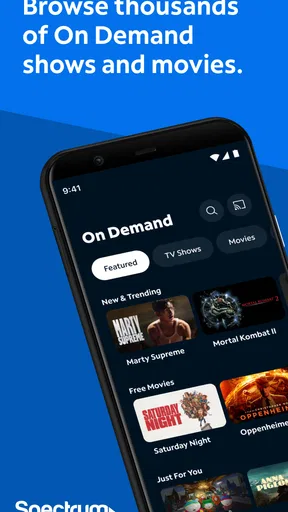
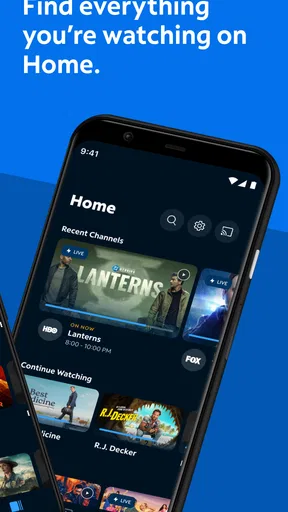
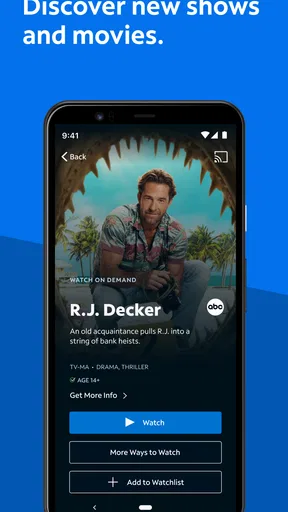
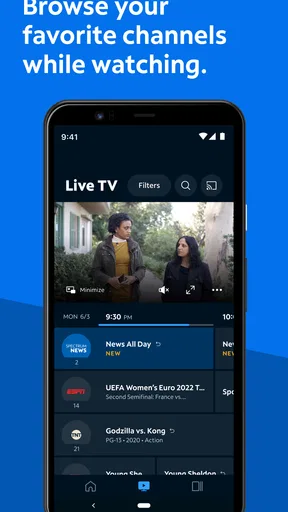
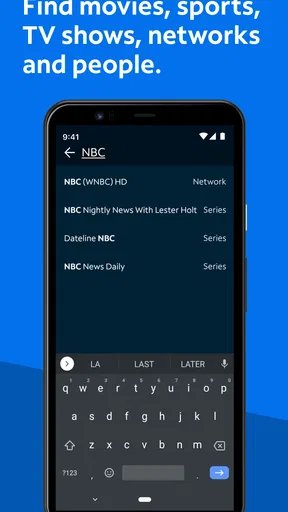
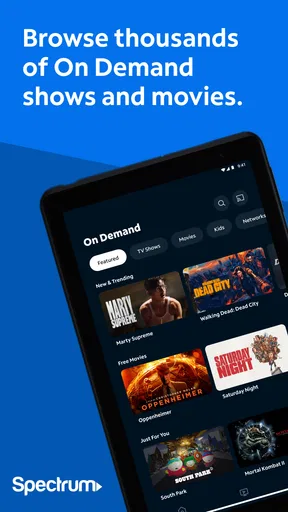
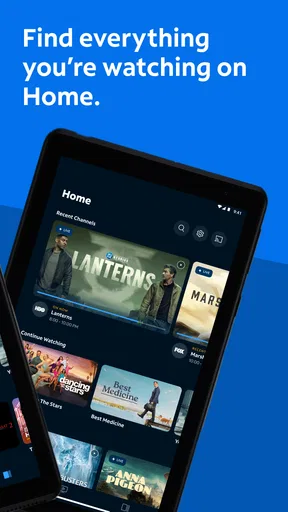
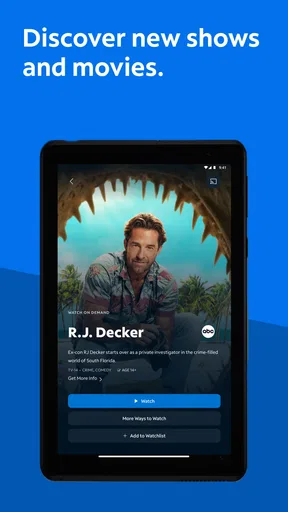
Our Review of Spectrum TV
 Analysis by Appyee
When I use a television app regularly, I care less about flashy presentation than about whether I can find something quickly, start watching without confusion, and keep control when my attention or surroundings change. Spectrum TV is built for that everyday purpose: it brings live television and On Demand viewing to Android devices for customers of Charter/Spectrum. In my experience, its strongest point is convenience rather than discovery. It is most useful when I already know what I want to watch or when I need a second screen away from the main television.
This is a free entertainment app, but that does not mean it replaces a Spectrum TV service. It works as a companion to the provider’s television offering, so the value depends heavily on whether Spectrum is already part of your household setup. If you are looking for a completely independent streaming service, this is the first distinction to understand. If you already use Spectrum, the app can make an existing subscription more flexible.
The best way to judge Spectrum TV is by how well it reduces the effort between opening the app and watching something. That includes readable menus, predictable navigation, manageable playback, and practical use in places where a television is inconvenient. It also means looking honestly at the people and situations it may not serve equally well.
How Spectrum TV feels to use in everyday viewing
I find the app most comfortable when I treat it as a portable way to reach the television service I already use, rather than as a place to browse endlessly. A small habit helps: decide whether I want live viewing or an On Demand program before opening the guide, then choose the screen size and setup that suit the session. That makes the next question practical: what changes when I use it during an ordinary day?
Readable navigation is more important than a crowded channel guide
The app’s basic job is easy to understand: browse television content, choose a live channel or On Demand program, and watch on an Android device. That straightforward purpose helps keep the experience focused. I do not approach it like a social platform or a large streaming library where I expect endless recommendations. I approach it like a portable extension of a cable television service.
For many viewers, that difference is helpful. Someone who wants to check live programming during a break does not necessarily need a complicated home screen. Someone who has already decided to watch a particular type of program can benefit from having familiar television content in one place. The interface is most comfortable when I use it with a clear goal instead of browsing indefinitely.
Text-heavy television guides can still create friction, especially on a phone. Channel names, program titles, times, and controls compete for limited space, and the amount visible at once depends on the device. I find a larger screen more comfortable for extended browsing, while a phone works better for a quick check or short viewing session. This is a useful trade-off: portability improves, but the smaller display gives the guide less room to breathe.
People with reduced vision may appreciate the ability to enlarge the device’s general display or text settings, although the result can vary depending on how the app lays out its controls. Enlarging text is not a guaranteed fix for every interface. It may make some labels easier to read while causing more scrolling or crowding elsewhere. I would test the app with the same display settings used across the rest of the phone rather than assuming that one adjustment solves every readability issue.
Navigation also matters for viewers who tire easily when scanning many options. A practical habit is to decide whether the goal is live television or On Demand before opening the guide. That small choice reduces unnecessary movement through menus. I also prefer holding the device in a stable position and using a larger display when I am comparing several programs, because constant scrolling on a phone can become tiring even when the controls themselves are simple.
Useful habits for people who do not want to search by touch alone
One of the more useful ways to approach the app is to treat the phone’s own assistance tools as part of the setup. Android’s screen magnification, text scaling, contrast options, and screen reader can change how comfortable the experience feels. Spectrum TV should not be assumed to behave perfectly with every combination, but these system-level tools are worth testing before deciding that the app is unusable.
For a person who has difficulty distinguishing small controls, I would begin with a larger screen and landscape orientation if the device handles it comfortably. I would then check whether the guide remains understandable when text is enlarged. The goal is not simply to make everything bigger; it is to preserve a clear relationship between a program title, its time, and the control used to start it.
Voice interaction can also help in a limited, practical way. Using the phone’s built-in voice features to open the app or adjust general device functions may reduce repeated tapping. That does not mean every in-app action can be completed hands-free, so I would not recommend Spectrum TV as a fully voice-operated viewing experience. Still, combining the app with the phone’s native tools can make opening and managing a viewing session easier for some users.
Motor and sensory considerations during playback
Touchscreen television controls are convenient, but they are not equally comfortable for everyone. A viewer with tremors, limited reach, or difficulty maintaining a precise tap may find small playback controls challenging, particularly when the controls fade away or appear only after touching the screen. In that situation, a tablet can be a better choice than a phone because it offers a larger target area and a more stable viewing surface.
A simple stand is another practical improvement. It keeps the device at a consistent angle, reduces the need to grip it throughout a program, and makes it easier to pause without accidentally shifting the screen. This is especially helpful when the app is being used while cooking, resting, or following a program from a wheelchair or bed. The stand does not add a Spectrum feature, but it changes the physical effort required to use the app.
Sensory comfort depends on the viewer and the environment. Watching live television on a small, bright screen can be tiring in a dark room, while glare can make the same screen difficult to read in daylight. I would adjust the phone’s brightness and use a viewing position that avoids reflections rather than judging the app only under ideal indoor conditions. Headphones can help someone who needs clearer audio in a shared room, but they can also reduce awareness of surrounding sounds, so the choice depends on the setting.
Live television has a particular sensory and control limitation: the viewer cannot treat it exactly like a personal media file. If I join a program late or need to step away, the experience is less forgiving than watching a program that is already available On Demand. That makes On Demand the better route for viewers who need frequent pauses, breaks, or a slower pace. It also makes live viewing less suitable when interruptions are unavoidable.
Where the app fits when the main television is unavailable
A realistic example is a household with one television and several people who want different things. One person can watch a live program on the television while another uses Spectrum TV on an Android device to catch up with On Demand content in another room. The app is not just a smaller television in this situation; it is a way to separate viewing spaces without requiring a second physical set.
It can also help when someone is away from the living room but still wants access to the household’s television service. A student studying in a bedroom, a family member resting after an illness, or a person waiting in a place where a television is not available may find the portable format useful. The experience is most dependable when the device has a steady connection and the viewer has enough battery for the intended session.
That last point is easy to overlook. A phone used for television competes with other everyday needs, including calls, navigation, work, and battery life. I would not rely on it as the only way to follow an important live program when charging is uncertain. A tablet or a plugged-in device is more sensible for longer sessions, while the phone is excellent for short viewing or checking what is currently on.
The app’s portability also changes how families think about sound. In a shared home, headphones can let one person watch without filling the room with audio. In contrast, someone who depends on loudspeaker playback or has difficulty using headphones may prefer the main television, where sound can be adjusted more comfortably. The app provides another viewing route, but it does not erase the physical differences between a handheld screen and a full television setup.
Live viewing and On Demand serve different accessibility needs
I see the live and On Demand sides as two different tools rather than two versions of the same feature. Live television is convenient when timing matters and I want to join a channel immediately. On Demand is more forgiving when I need to pause, step away, or choose a program at my own pace. For viewers with attention difficulties, variable energy, or unpredictable interruptions, that flexibility can matter more than the size of the catalog.
There is also a planning advantage. If I know that a viewing session may be interrupted, choosing On Demand first avoids the frustration of trying to keep up with a live broadcast. If I only have a few minutes and want to see what is currently airing, live television is quicker. Matching the mode to the situation is one of the most effective ways to make the app feel easier without changing any settings.
On Demand viewing is not automatically perfect for every viewer. A person who needs very specific control over playback should check how comfortable the available controls feel on their device. Some viewers will prefer the predictable structure of a traditional television remote, especially if touch gestures are difficult. The app is more appealing to people who are already comfortable with Android navigation than to someone who finds touchscreen controls tiring or uncertain.
What may still create barriers
The largest practical barrier is the relationship with the provider. Because Spectrum TV is developed by Charter/Spectrum and functions as part of that television ecosystem, it is not the right pick for someone who wants a standalone app with no connection to a cable service. A general streaming platform may be a better match for a viewer who wants to subscribe independently, compare separate libraries, or use one account without a household television package.
Another barrier is device dependence. The app is designed for Android and supports devices running Android 6.0 or later, which gives it a broad compatibility range but does not guarantee that every older phone will feel fast or comfortable. A device can meet the operating-system requirement and still have a small display, limited battery, or sluggish performance that affects the viewing experience. I would consider the physical device as carefully as the app itself.
Connectivity can also shape the experience. Streaming video is more demanding than reading a guide, so a weak or unstable connection may make portable viewing less pleasant. This matters particularly for people who use mobile devices in different rooms or travel between locations. The app is most useful when the viewing environment is predictable; it should not be treated as a guarantee of uninterrupted television everywhere.
Accessibility expectations need to be realistic. The app can be combined with Android’s built-in accessibility options, but I would still test the exact tasks that matter: opening a program, identifying the current selection, starting playback, pausing, and returning to the guide. A person who relies on a screen reader, enlarged text, or alternative touch settings should try those workflows before committing to the app as a primary television tool.
There is also a cognitive barrier for people who dislike switching between live channels, guides, and On Demand areas. Traditional television can feel more immediate because a remote presents a small set of familiar actions. Spectrum TV asks the viewer to work through a mobile interface, and that may be an advantage for some people but an extra layer for others. If the goal is the simplest possible operation, a conventional television setup may remain easier.
Who will get the most from Spectrum TV
I would recommend it first to existing Spectrum customers who want their television service to follow them around the home. It is particularly useful for people who alternate between live viewing and On Demand programs, households sharing a television, and viewers who prefer using a phone or tablet instead of staying in front of the main screen.
It also makes sense for someone who values familiar provider-based television more than the open-ended browsing style of standalone streaming apps. The experience is less about assembling a personal collection from many services and more about extending one established television relationship to an Android device.
I would be more cautious for people who need a completely hands-free interface, rely on highly specialized accessibility controls, or find small touch targets difficult. I would also steer away from it for someone who does not use Spectrum television at all. In those cases, a service designed around independent subscriptions or a device with a physical remote may reduce more frustration than this app can.
What the numbers suggest, without replacing personal testing
The app has a 4.7 average from around 365 thousand ratings, and it has passed 10 million installs. That level of adoption suggests that many people find the basic concept useful, especially those already connected to Spectrum’s service. It is encouraging, but popularity cannot answer the accessibility questions that depend on an individual’s vision, hearing, motor control, device size, and home network.
Its Teen content rating is another reminder that this is a broad television destination rather than a children-only viewing tool. Parents should choose programs with the same care they would use on the household television. The app itself is free to install, but the practical cost is tied to the television service and setup a household already has, so “free” should not be read as a promise of unrestricted television without a provider relationship.
The app has been available since November 29, 2011, and the current release is 10.9.0.287932624.release. That long presence and continuing version updates make it feel like an established companion rather than a new experiment. Even so, I would keep expectations focused on access to Spectrum television, not on features associated with every modern streaming platform.
My inclusive verdict after weighing convenience against control
Spectrum TV is a useful Android entertainment app when the viewer already uses Spectrum and wants live television or On Demand content in more places. I like its practical role: it can free someone from the main television, support a second viewing space, and make short sessions possible on a phone or tablet. The strongest accessibility benefit is situational flexibility, especially when On Demand viewing allows a person to pause and return at a more comfortable pace.
Its weaknesses are equally practical. Small-screen navigation can be tiring, touch controls may not suit every motor ability, and the app cannot substitute for a physical remote or a fully independent streaming service. Accessibility tools built into Android may improve the experience, but I would test the complete viewing workflow rather than relying on a label or assumption.
My recommendation is therefore conditional but positive: if Spectrum is already your television provider, install it and evaluate it on the device you actually plan to use. Try a short live session, then try On Demand with your preferred text, magnification, audio, or voice settings. If those tasks feel manageable, the app is a convenient extension of your television service. If they feel awkward, a larger tablet, the main television, or a different kind of streaming setup may be the more inclusive choice.
Verdict
Strengths of Spectrum TV
- Live TV, on-demand shows, and movies are available in one app.
- Supports multiple profiles for personalized viewing recommendations.
- Includes a useful channel guide for quickly finding current programs.
- Cloud DVR integration makes it easy to manage recorded content.
- Parental controls help restrict unsuitable channels and programs.
Limitations of Spectrum TV
- Requires a Spectrum TV subscription and compatible service area.
- Some channels and features may vary depending on your subscription plan.
- Streaming quality depends heavily on your internet connection.
- The app may use significant mobile data when streaming over cellular networks.
- Occasional playback issues or sign-in errors can interrupt viewing.
Other Releases by Charter/Spectrum
View All
My Spectrum
Tools4.8

Spectrum News: Local Stories
News & Magazines4.1
Similar Picks in This Category
View All
Google Play Games
Google LLC3.9

Netflix
Netflix, Inc.4.8

YouTube Kids
Google LLC4.2

Disney+
Disney4.4

Prime Video
Amazon Mobile LLC4.7

Steam
Valve Corporation3.2
Frequently Asked Questions
What is Spectrum TV, and what can I watch with it?
Spectrum TV is a streaming and live television app for Spectrum customers. After signing in with an eligible Spectrum account, you can browse live channels, watch selected on-demand movies and shows, view TV listings, and manage recordings when supported by your Spectrum TV service. The available content depends on your subscription, location, device, and current licensing agreements.
Do I need a Spectrum subscription to use the Spectrum TV app?
Yes, most of the app’s main features require an active Spectrum TV subscription and valid Spectrum account credentials. The application is designed primarily for existing Spectrum customers rather than people looking for a completely independent streaming service. Channel access may vary depending on your package, and some networks can require additional authentication or may only work inside your home network.
Which devices are compatible with Spectrum TV?
Spectrum TV is generally available on supported Android and iOS mobile devices, tablets, web browsers, and selected streaming platforms or smart televisions. Compatibility can change as operating systems and app versions are updated, so users should check the current requirements in Google Play or the App Store. Older devices may install the app but provide limited performance or unsupported features.
Can I watch Spectrum TV away from home or use it while traveling?
You can usually watch some Spectrum TV content away from your home, but off-home access is subject to restrictions. Certain channels, programs, and features may be available only when connected to your Spectrum home internet, while other content can be streamed through mobile data or another Wi-Fi network. Availability also depends on location, licensing rules, and your subscription package.
Does Spectrum TV support DVR, downloads, and multiple devices?
Spectrum TV may support cloud DVR features for eligible customers, allowing you to schedule, manage, and watch recordings through compatible devices. DVR availability, storage limits, recording duration, and playback rules depend on your plan and equipment. Offline downloads are not guaranteed for every program, and simultaneous streaming or device limits may apply, so check your account terms before relying on the app for travel.
